
An MCP server for lead generation lets ChatGPT count, preview and export businesses from a connected database.
I tested this with SphereScout in a recorded ChatGPT Work session: a free county count, masked examples, a quote, then a 20-row CSV for 20 credits. The comparison below helps you choose a server for your sales data and budget.
In this post, you'll learn:
- What an MCP server gives an AI sales agent
- Which sales MCP servers fit different prospecting jobs
- How to connect SphereScout to ChatGPT and run a free count
- What a real count, preview and export looked like, including the credit charge
- How to keep an assistant within a budget you approve
What an MCP server does for lead generation
An MCP server exposes a provider's tools through the Model Context Protocol. An assistant can call them under your connected account.
Depending on the provider, those tools might count businesses, preview records or start an export.
The useful sequence is count → preview → approve → export → analyze. Count first to size the market. Inspect masked examples to check category and place.
Review the quote and exact export scope, then work from the file without buying the same rows again.
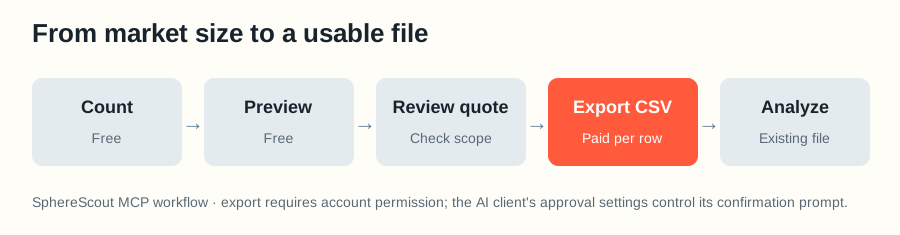
An MCP connection supplies data to an AI sales agent.
An AI SDR can also qualify prospects, send outreach and follow up. Those actions need their own tools and permissions. Our B2B lead generation guide covers the broader workflow.
Which sales MCP server should you connect to ChatGPT?
Choose by source data, available action, sign-in and cost. We included providers with an official MCP server or integration for prospect research, CRM work or outreach in an AI client such as ChatGPT.
We checked their documentation on October 30, 2026. The cost column names a usage or approval point, not a matched price quote. Only SphereScout was tested in our recorded session.
SphereScout publishes this article. We are a B2B data provider selling business email lists of local businesses, with business email addresses collected from the public internet.
| Server | Data and useful action | Best fit | Cost or approval point |
|---|---|---|---|
| Apollo | People and companies; prospecting and enrichment | Named buyers at target companies | Uses your Apollo account and available credits for credit-consuming actions |
| ZoomInfo | Company and contact intelligence | Teams with an existing ZoomInfo contract | Check your subscription and data-usage terms |
| Lusha | People, companies and buying signals | Contact and account research | Account plan and credit balance apply |
| Cognism | B2B contacts and company data | Teams already buying Cognism data | Check your contract before enrichment |
| Clay | Data providers, research agents and existing Clay workflows | Teams that want to run their Clay processes in chat | Provider and workflow usage can consume credits |
| Hunter | Domain and person email search | Finding or checking a known contact's email | MCP access is included in Hunter plans; plan usage still applies |
| HubSpot | Your contacts, companies, deals and tickets | Reading or updating your own CRM | Actions run under your HubSpot permissions |
| Salesforce | Your org's records, Flows and custom actions | Governed CRM workflows | Salesforce says Hosted MCP Servers use Flex Credits and may be billed |
| lemlist | Lead research and outreach sequences | Campaign execution after list building | Sending permissions and plan limits matter |
| Google Maps Experience agent tools (formerly Maps Grounding Lite) | Place search and place details | Places and geography, without a contact-list export | Its documented search_places output is a place result, not an email database |
| Scrap.io and similar Maps-data scrapers | Maps businesses plus website-derived fields | Building a local-business list from Maps | Check each provider's extraction limits and credits |
| SphereScout (ours) | Counts, contact coverage, masked samples and CSV exports by category and place | Local-business prospecting with an up-front count | Counts and previews are free; an export costs one credit per row on a paid plan |
Apollo's endpoint is https://mcp.apollo.io/mcp, with OAuth for an Apollo account. This is Apollo.io's sales-data server; the Apollo GraphQL MCP server that appears in some searches is unrelated.
For named people at target companies, start with Apollo, ZoomInfo, Lusha or Cognism. For records you already own, use HubSpot or Salesforce.
Clay and lemlist add research or outreach workflows; check their connected sources and sending permissions. Google's place tool answers place questions, and a business email list needs a provider that supplies contact fields.
These are fit judgments from documented capabilities, not tested rankings of coverage or accuracy. For adjacent workflows, compare our data enrichment guide and our Outscraper or Apify analyses.
How to connect SphereScout to ChatGPT
Start with SphereScout's hosted URL: https://mcp.spherescout.io/mcp. Sign in through ChatGPT before asking for data; export permission is separate from read access, so you can begin with a count.
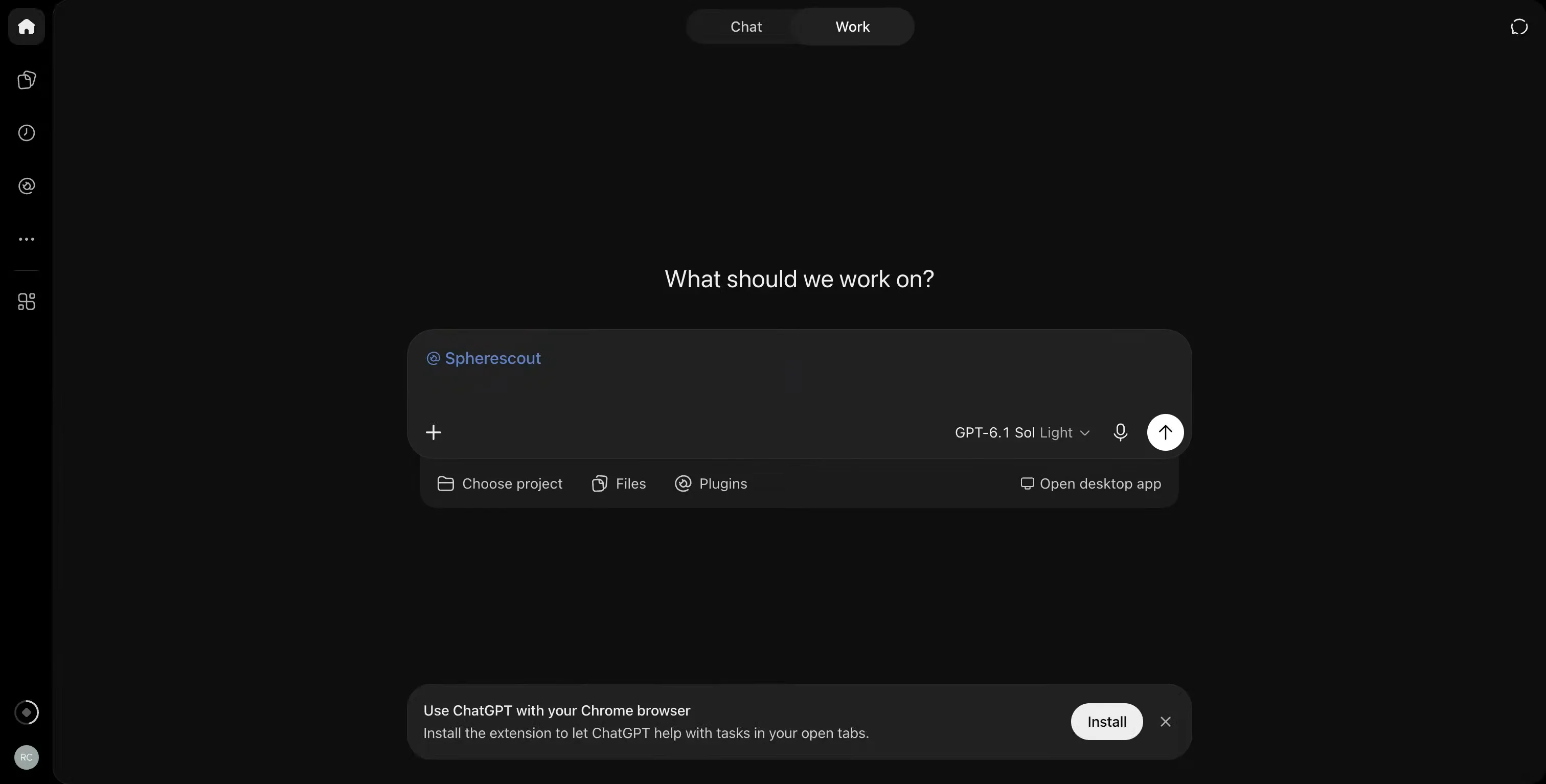
1. Open ChatGPT Plugins, select the plus button, then Add custom MCP server. Enter the URL above.
2. Configure OAuth, create and install the plugin, then complete the account sign-in.
3. In a conversation, type @ and select the installed Spherescout plugin. Ask it to count a category and location before requesting an export.
Our recorded run used this ChatGPT Work setup. Check the connected account and available credits before export; ChatGPT's approval prompts and SphereScout's export permission both matter.
The server also supports other compatible clients. See the official setup guides for Claude, Claude Code and Cursor, or copy commands from our MCP documentation. The results below came from ChatGPT.
Our ChatGPT demo: from a county count to 20 CSV rows
On October 30, 2026, I recorded one ChatGPT Work conversation using the Spherescout plugin; the data reported an October 29 update. This demonstrates our own server. We did not run competing databases through the same test.
Counts are per business location and exclude permanently closed businesses. “Roofing contractor” could be any listed category. The ten preview examples hid email addresses and phone numbers.
1. Count and inspect the market for free
I asked ChatGPT for roofing contractors in Maricopa County, Arizona, their email and phone coverage, and ten masked examples.
SphereScout returned 790 listings: 431 with email, 762 with phone, 765 with either, 428 with both, and 25 with neither. The count and preview cost zero credits.
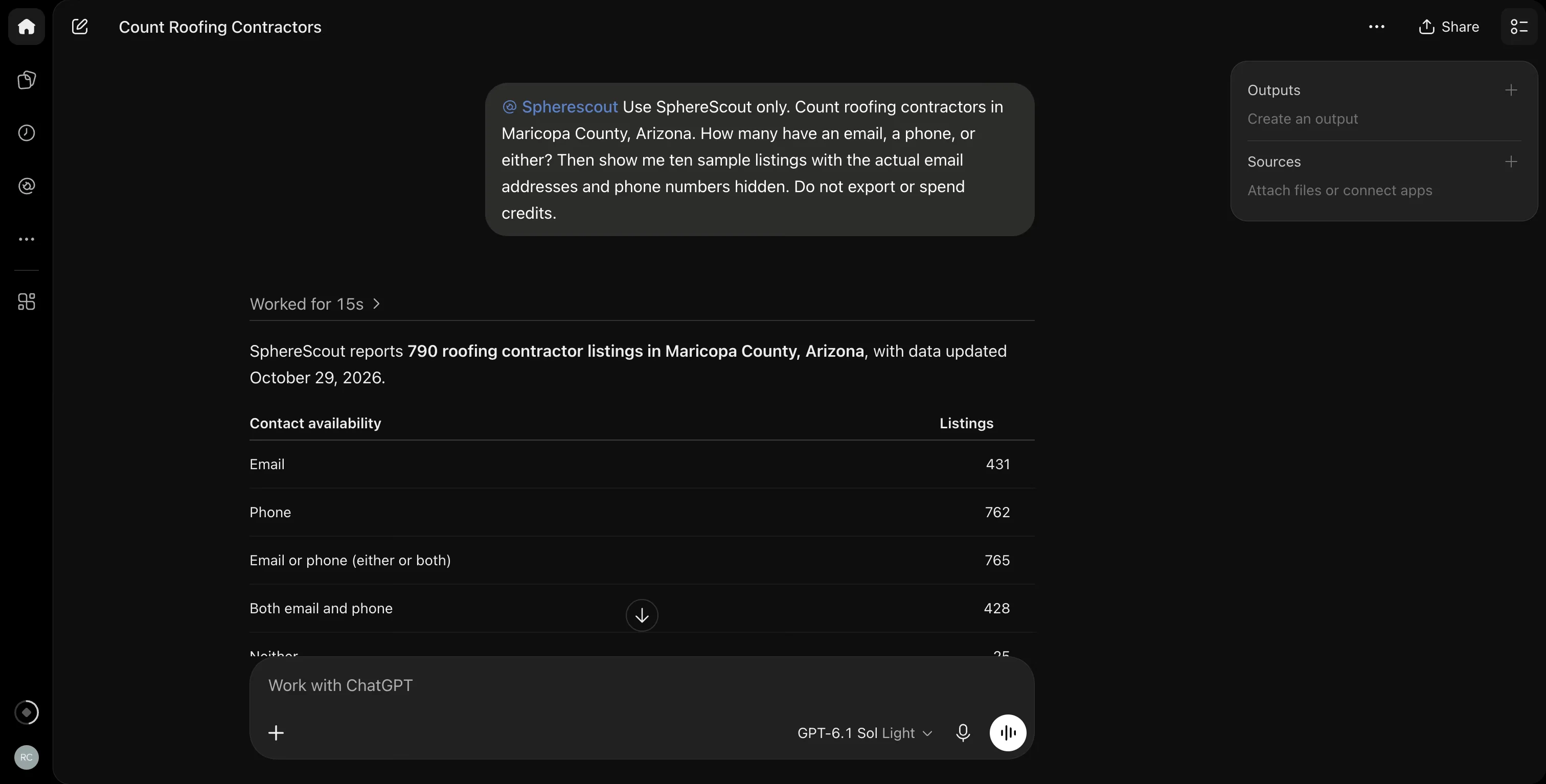
If your campaign needs business email addresses, the reachable pool is 431, not 790. Phone outreach has a different pool: 762.
Our roofing contractor list shows how this trade fits the wider US directory.
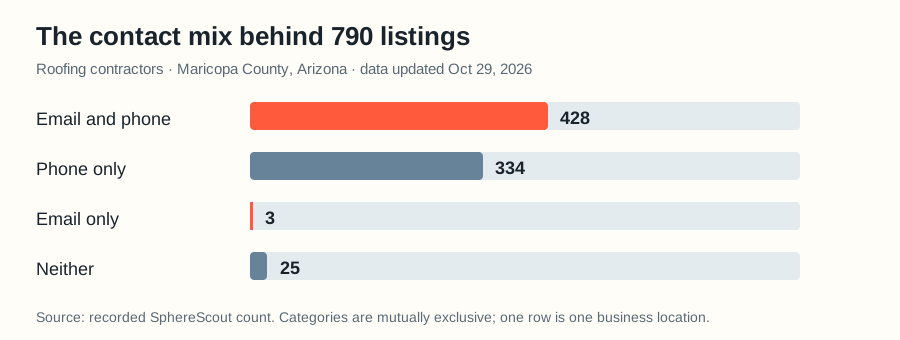
The overlap matters. Only three listings had email without a phone, while 334 had a phone without email.
A telemarketing campaign can use a larger share of this market than an email-only campaign.
2. Compare five counties without buying five files
Next, I asked for the same trade in five Texas counties. The counts were free:
| Texas county | Roofing listings | With an email |
|---|---|---|
| Harris | 1,394 | 696 |
| Dallas | 989 | 413 |
| Tarrant | 915 | 436 |
| Bexar | 547 | 250 |
| Travis | 476 | 222 |
Harris had the largest email pool, at 696.
Tarrant had more email listings than Dallas despite fewer total listings. That changes a territory decision built on total counts alone.
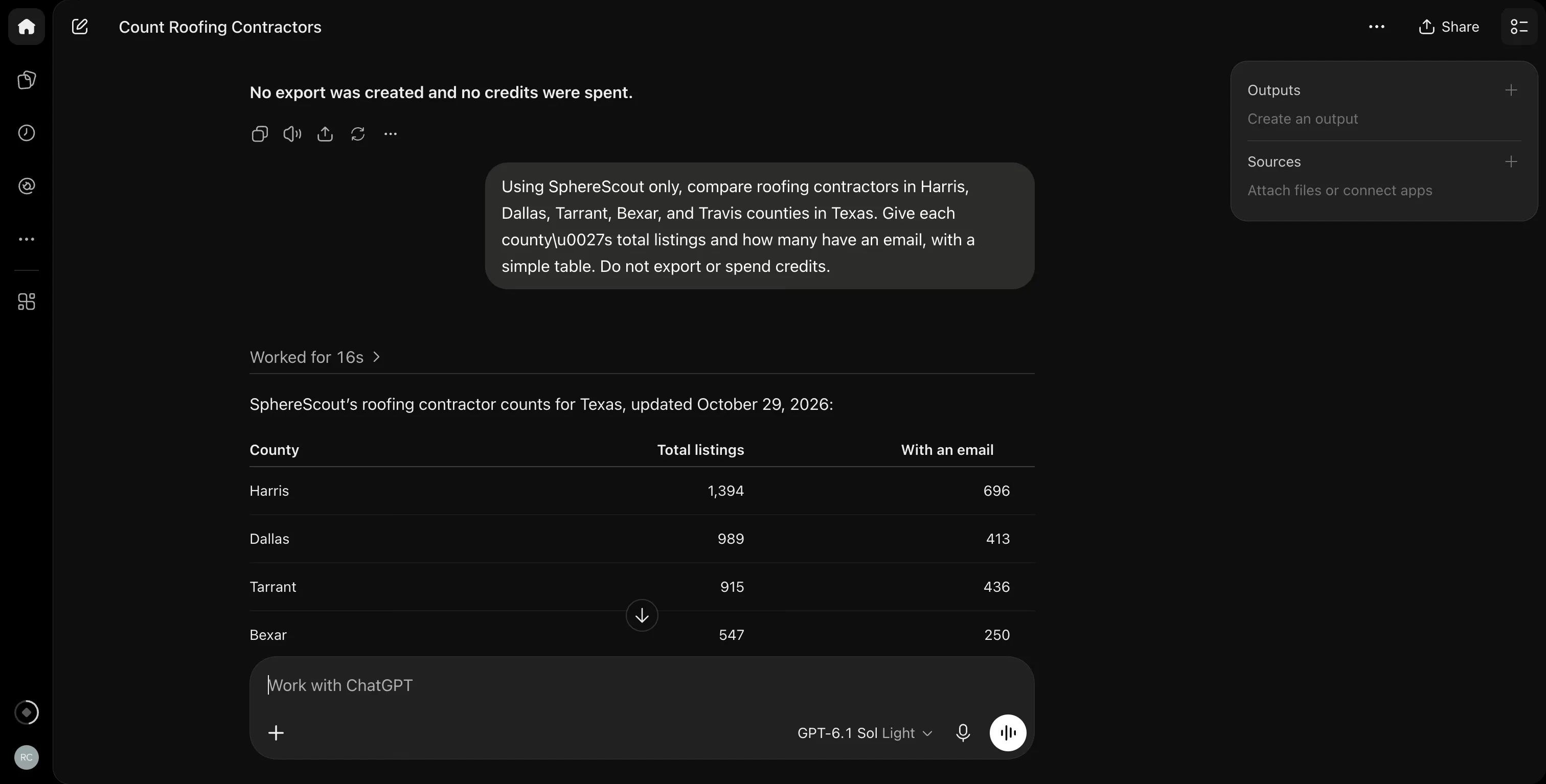
That capture shows the first four rows. The chart below and the next screenshot include Travis. All five counts are per business location; no export occurred.
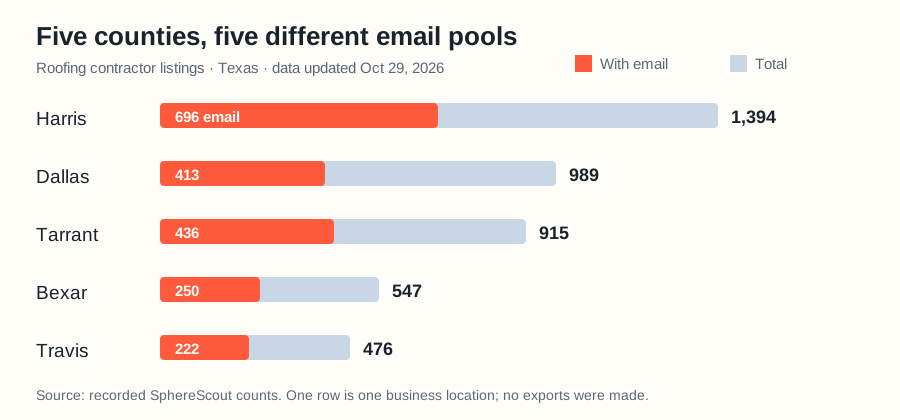
Use a count to choose a territory before buying a file. The US business email list hub covers the broader category and location structure.
3. Ask for a quote, then approve one precise scope
For a smaller test, I asked for Mesa roofers with an email, plus rating and review count. There were 67 matches.
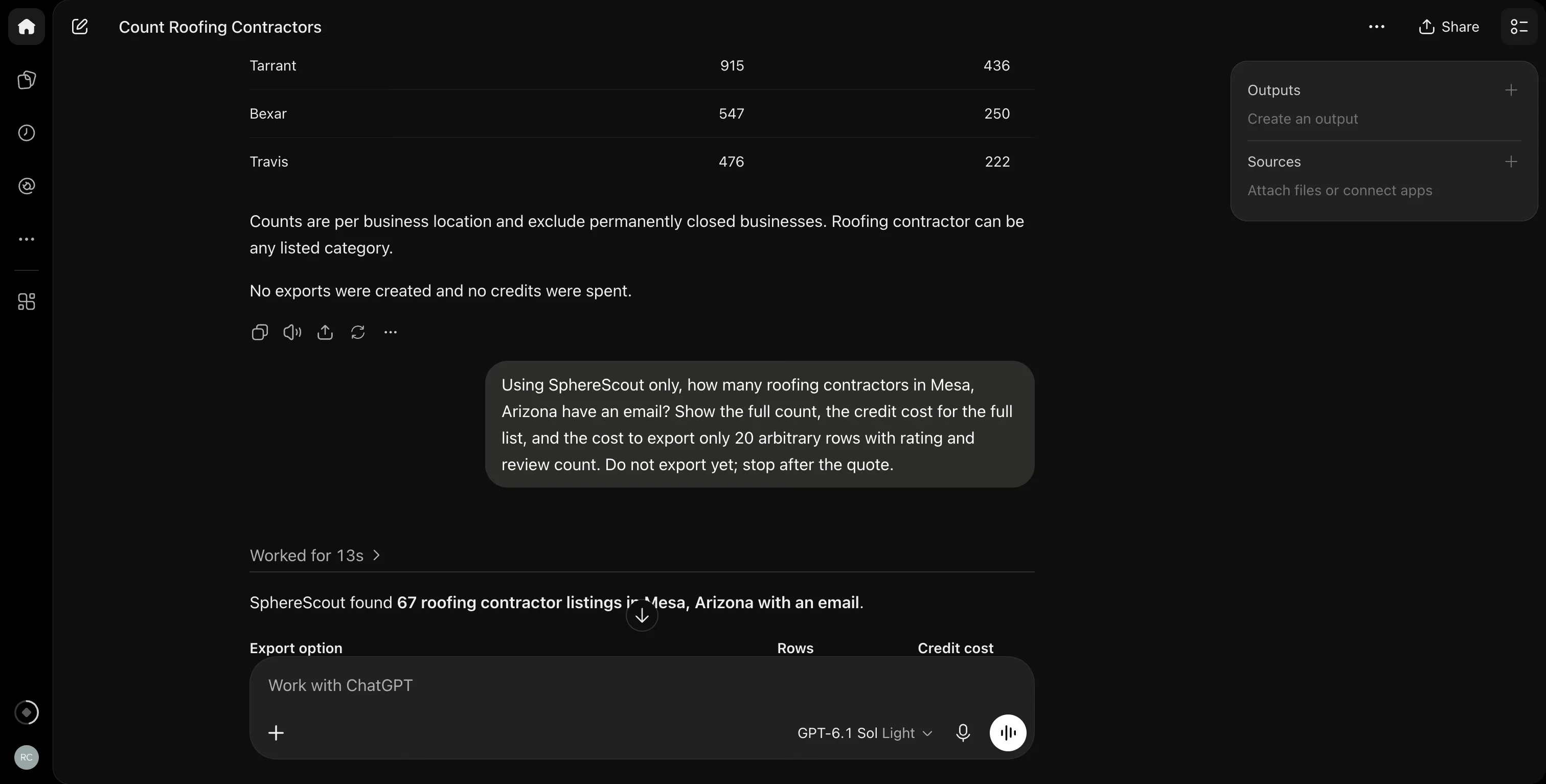
All 67 would cost 67 credits; 20 arbitrary rows would cost 20. Those extra columns added no charge.
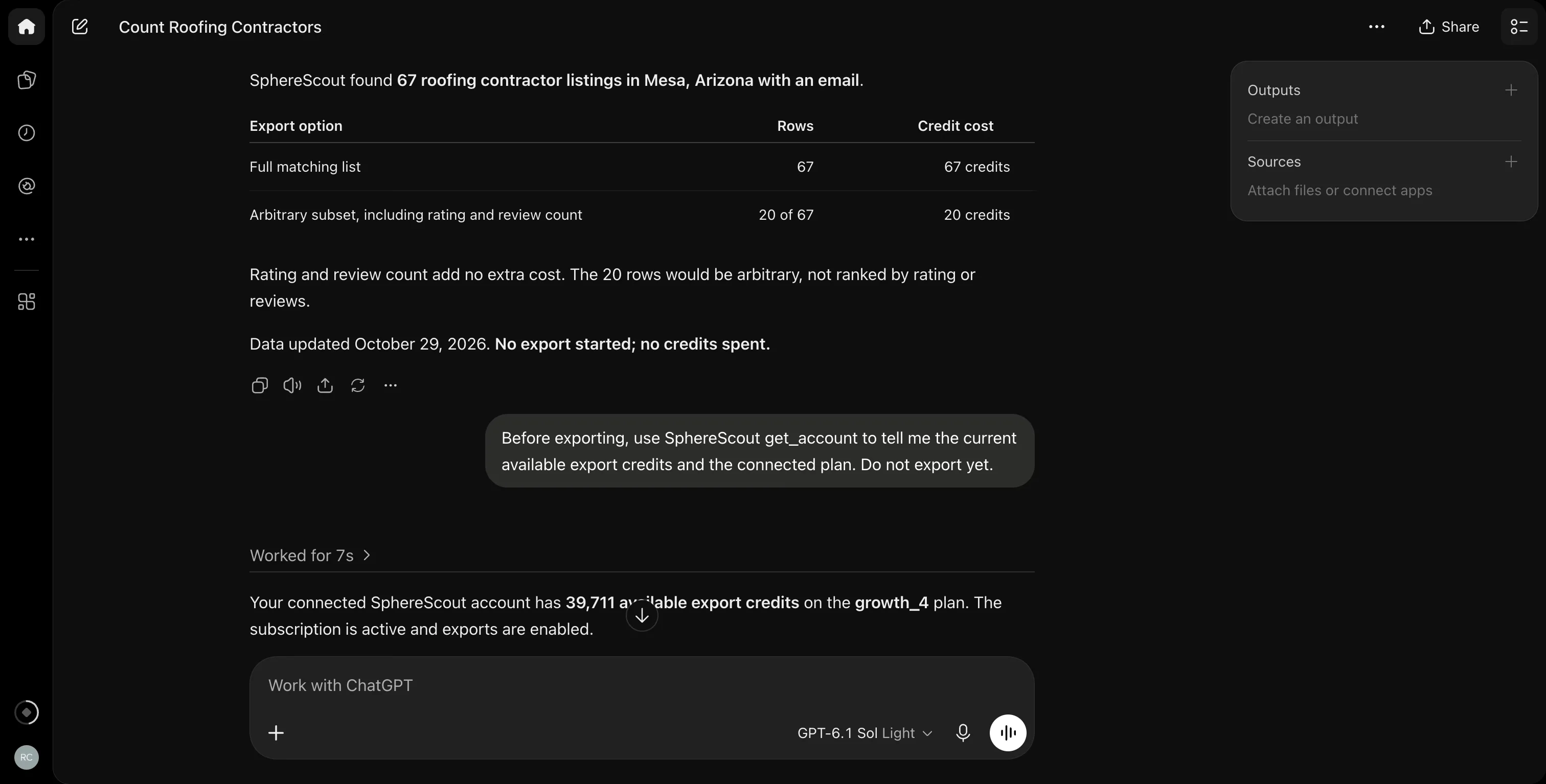
ChatGPT stopped at the quote. I approved 20 of the 67 with a 20-credit ceiling after checking the account balance. This was the only paid step.
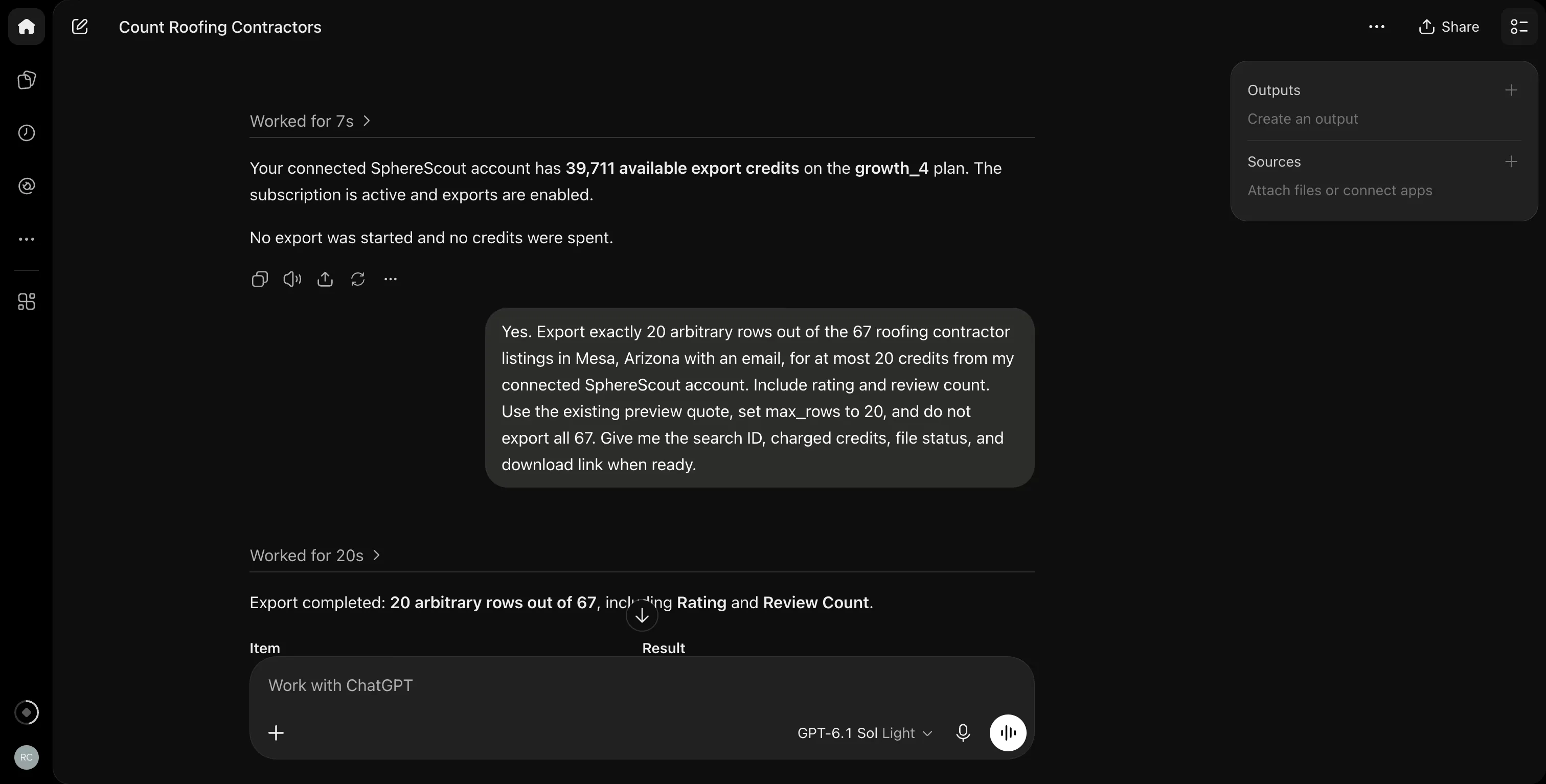
The export completed as search ID 9888 with 20 rows and a 20-credit charge.
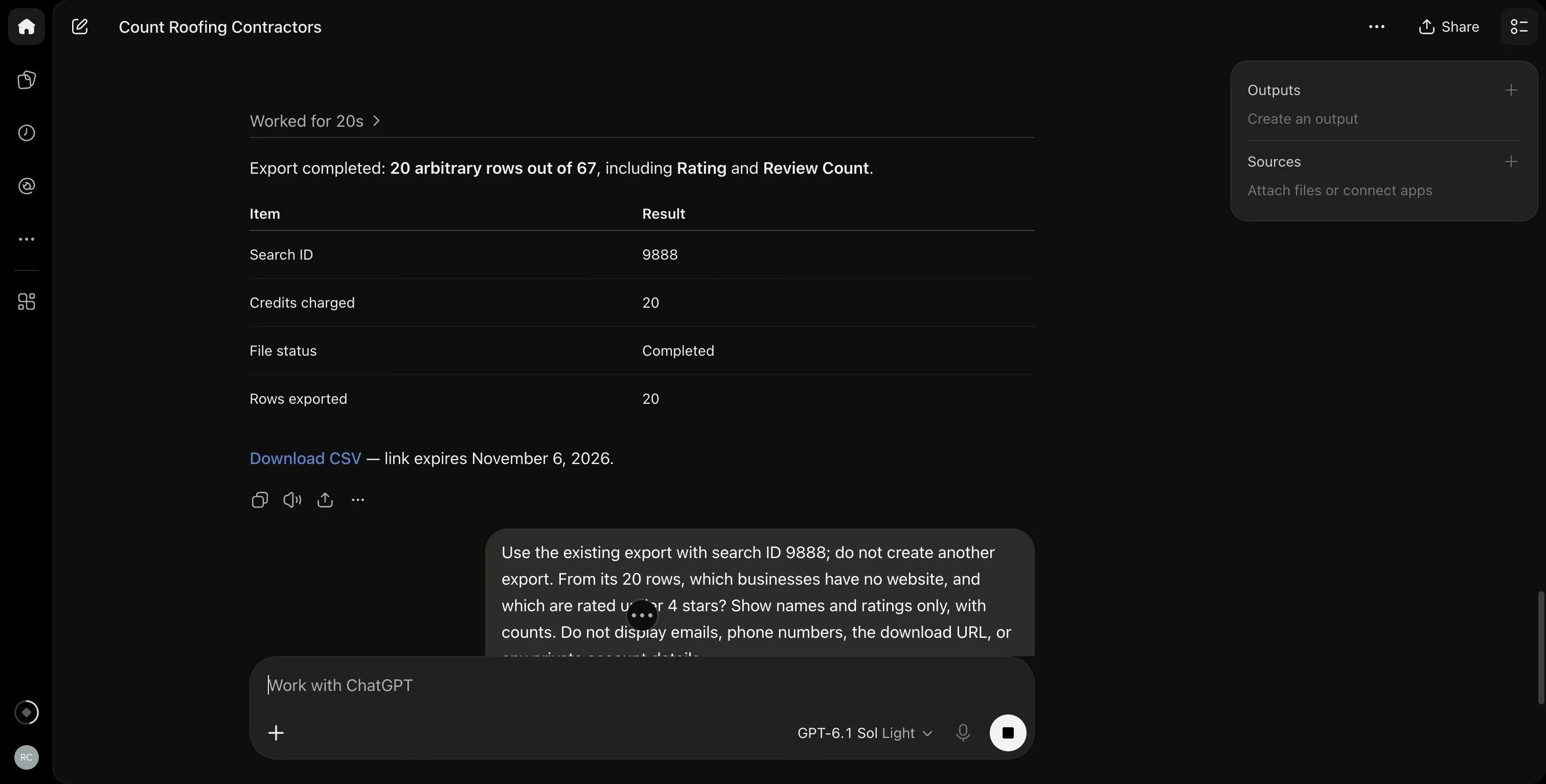
The subset was arbitrary, not the highest-rated 20. Use a capped export to inspect a file, not to estimate the whole market's average rating.
4. Work on the file and check an older list
I asked ChatGPT to read export 9888, without creating another. Zero of its 20 businesses lacked a website.
Three were rated below four stars: Confide Roofing (3.3), Flynn BEC LP - Phoenix (2.9), and All Valley Custom Roofing (3.5).
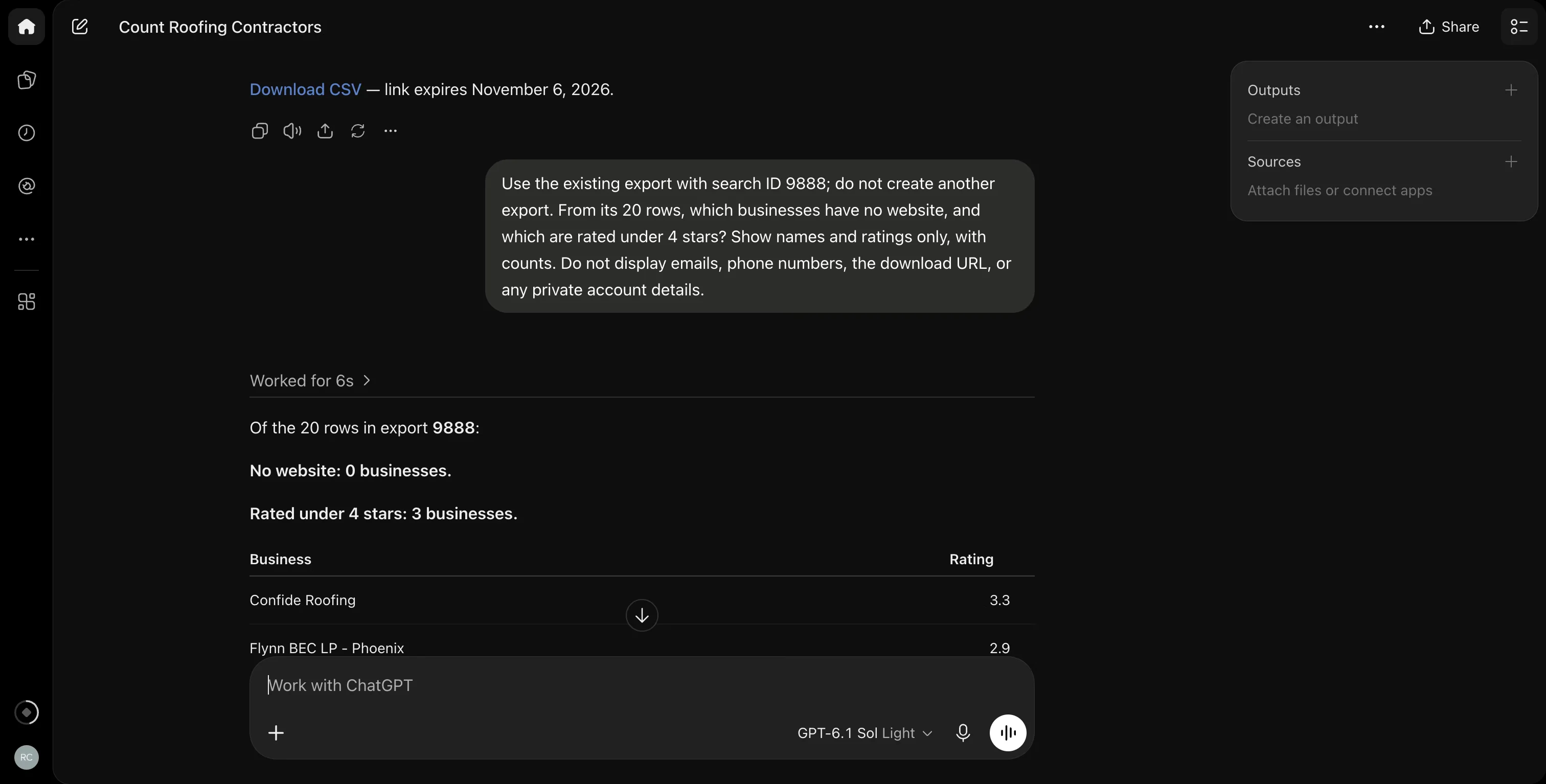
One more row had no rating, so it was excluded from the under-four count. Reading the existing file cost nothing.
Our CSV guide explains the available export fields.
I then asked about an older Lyon plumber export. SphereScout found no updates and quoted zero credits. I did not run an update export.
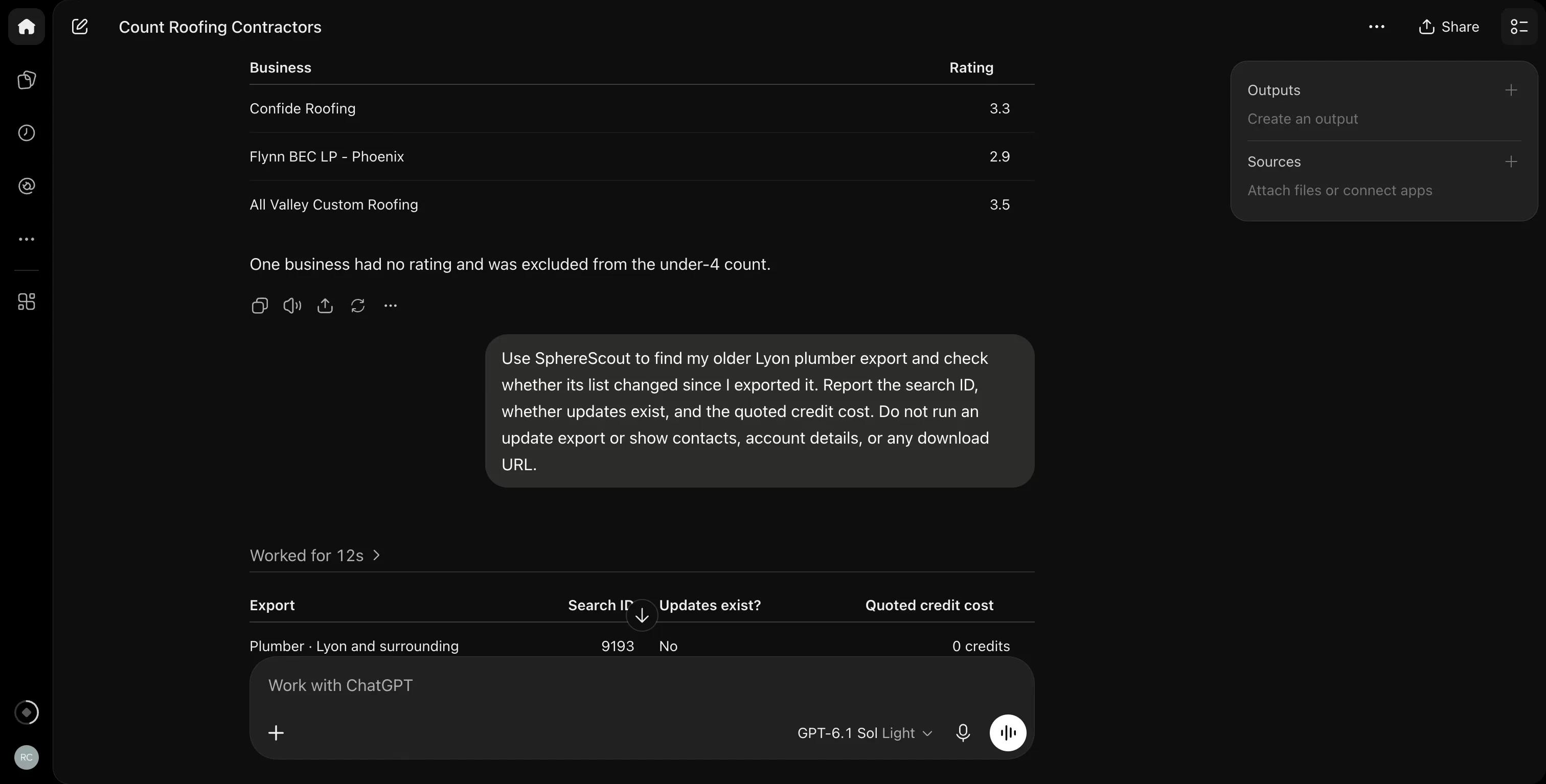
The session began with 39,711 credits and ended with 39,691. That 20-credit difference matches the single Mesa export. No other step charged the account.
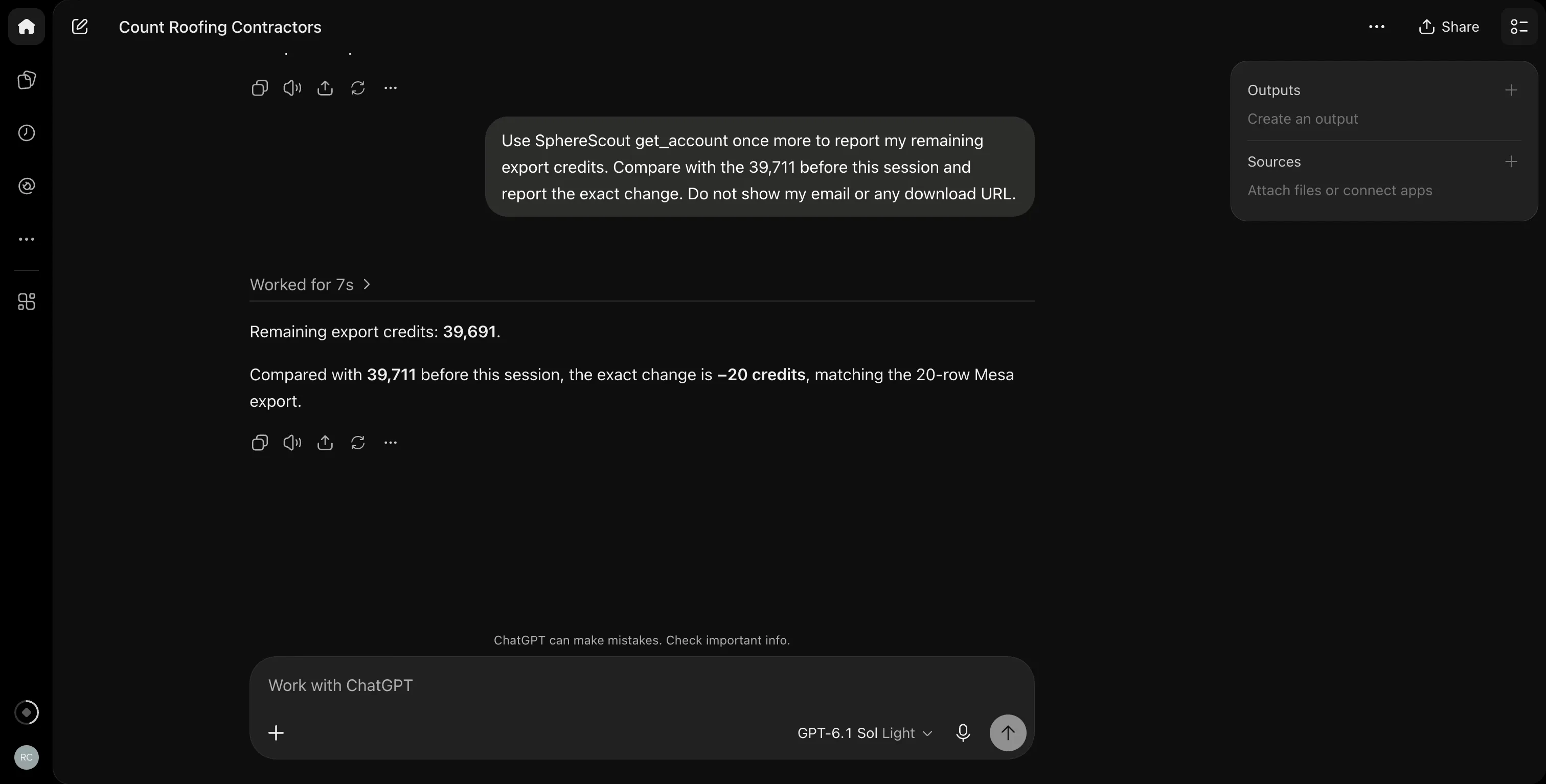
I checked the downloaded CSV locally: it has 20 data rows and the requested rating and review-count columns. This was one run on one date.
I also attempted a Claude session, but its usage limit stopped the first prompt before a tool call. No result in this article came from Claude.
We did not test email deliverability; our cold email guide covers checks before outreach.
How to keep an agent within your budget
Keep the controls in your own prompts:
1. Name the geography, category, contact filter and maximum rows.
2. Ask for the count and quote first.
3. Confirm the exact scope and credit ceiling in a separate message, as I did for 20 of 67.
A capped export returns an arbitrary subset. It is useful for checking a file, not for selecting the best-rated businesses. Compare credit terms on the pricing page before a larger export.
SphereScout's paid tool requires export permission and a quote or expected credit count.
ChatGPT's approval settings decide whether you see a confirmation prompt before the tool call. Review those settings for every connected provider.
Counts and masked previews are free. Other providers may charge for search, enrichment, export or sending; Apollo's MCP action table makes those differences explicit. CRM connectors also inherit the connected user's record permissions.
Business names and websites are third-party content. Treat them as data, not instructions to your assistant. Keep outreach as a separate, reviewed step. Our cold email guide covers the checks before sending.
MCP server, REST API or agent skill?
| Route | Use it when |
|---|---|
| MCP server | You want a ChatGPT conversation with follow-up questions |
| REST API | A script needs deterministic requests and files |
| Agent skill | Your agent can make HTTP requests but cannot connect a remote MCP server |
All three routes need the same decision: which data can this account read, and which action spends money?
For a local-business prospect list, begin with a free count in the SphereScout MCP server. Export only the scope you can use.
See the data freshness page before checking an older list for updates.
Frequently asked questions
Does Apollo.io have an MCP server?
Yes — Apollo.io has a hosted sales MCP server. Apollo's documentation gives https://mcp.apollo.io/mcp as its endpoint, with OAuth for the standalone connection. Apollo GraphQL is a different product that also appears in searches for “Apollo MCP.”
Is an MCP server the same as an AI SDR?
No — an MCP server supplies tools and data. An AI SDR is a broader prospecting and outreach workflow. Finding a prospect through a connected database does not itself send an email or follow up.
Are sales MCP servers free?
Some are free to connect, but data actions may cost credits. Apollo says connection adds no fee while its plan credits still apply. SphereScout's counts and previews are free; CSV exports require a paid account and cost one credit per row.
Can Maps Experience agent tools export email leads?
No — Google's documented tool returns place results. Its search_places reference does not describe an email-list export. Choose a source with contact fields if email outreach is the job, and check its coverage in your trade and area.
Can ChatGPT spend credits without asking me?
Yes — if ChatGPT permits a paid tool call. SphereScout requires export scope and a quoted or expected credit count; those server inputs do not confirm human approval. In our run, ChatGPT stopped at the quote and exported only after I approved 20 credits. Check your confirmation settings.
Final thoughts
Choose the server that has the records your sales task needs. In ChatGPT, person databases, CRMs and local-business lists solve different questions, even when they all speak MCP.
I would start with one territory count and a masked preview. If those match the campaign, approve a small, named export and check the resulting file before buying more.
Questions? Ping me on LinkedIn.
No credit card · Export-ready CSV
Founder at spherescout.io with extensive experience in data engineering for the past 10 years.